
- HOME
- iPhone Generations
- iOS
- iOS 8 Best Features
- Siri
- iOS Music
- iPhone News
- iPhone Specs
- iPhone SMS
- iPhone Applications
- iPhone Video
- AirPlay
- iPhone TV
- iPhone Network
- iPhone GPS
- iPhone Ringtones
- iPhone Tips
- iPhone Sys Tricks
- iPhone Emulators
- iPhone Hacks
- iPhone Customization
- iPhone Accessories
- Cheap Calls
- Buy iPhone
- Arabic iPhone
- Hot Topics
- Privacy Policy
- Site Search

Skype for iPhoneSkype for iPhone is similar to Skype for Mac or PC that it allows you to make free video calls with other Skype users, and also it allows you make cheap international calls to landline phones. Skype for the iPhone is free and available from the App Store. In order to make a free iPhone to computer voice or video call, both parties must have Skype installed on their device and the program must be running on both devices. Moreover, you must have a Skype account or a Skype name or ID. Signing up for a Skype account is free and can only be done using your desktop computer, or through Safari for iPhone. Once you sign up, you will get a login or a User ID that allows you to login to your account and add your contacts.
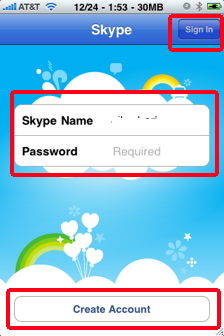
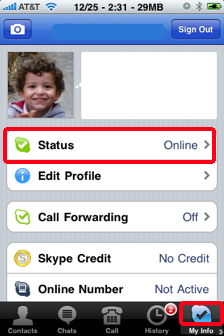
Every time you start Skype, you will be asked to enter your login and password to access your account. Once you are logged in, your status will be updated to "Online". You can always change your status by tapping the "Status" button.
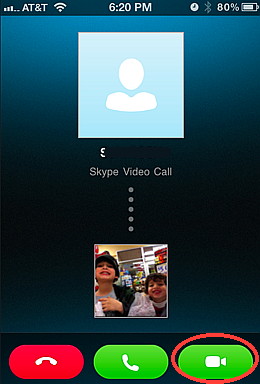
This means that you can receive and initiate voice or video conversation, and text chatting with other online Skype users, and they can also contact you. If someone calls you, you will receive a ring tone indicating that someone is calling you. Then, you will have the option to Answer, Decline or start a video chatting session. The name of the caller will be displayed, and his/her picture would show up in the screen if he/she has a profile. Once a video chat session has started, you can easily switch between the front facing camera and the rear camera if you have an iPhone 4 or iPhone 4S.
Managing Contacts with Skype for iPhone:
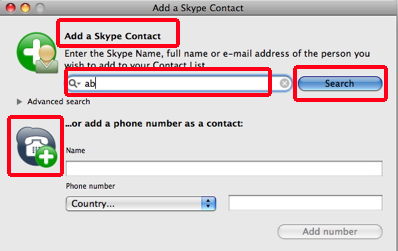
To add a contact to your list using your desktop, select contacts from the contacts menu on your PC or Mac, and then select Add a Contact or New Contact. A window will open that allows you to either enter the name of your contact if you know it, or r search the Skype directory for one. If you find the contact you are looking for, you can add him/her to your contact list. A request to that contact will be sent informing him/her of your interest in sharing contact information.
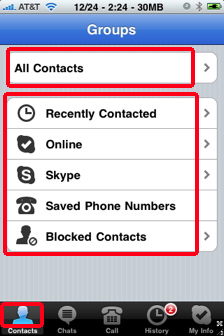
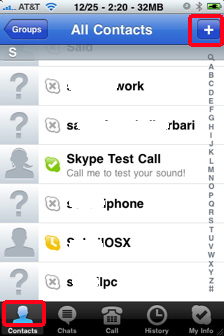
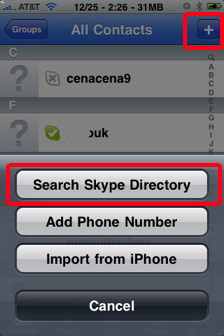
You can also add a contact using the Skype application on your iPhone instead of using your desktop computer web browser. Tap the Contacts button at the bottom using Skype for iPhone to access your contacts options. Then tap All Contacts, and then tap the Plus button at the top right. You will get a screen with three options.
The added contact will show up in your list of contacts, and you can chat with him if he appears online after he accepts your invitation request. Those contacts will show up
in your account no matter what computer or what Skype you use. This
information is stored on the Skype server and can be accessed from
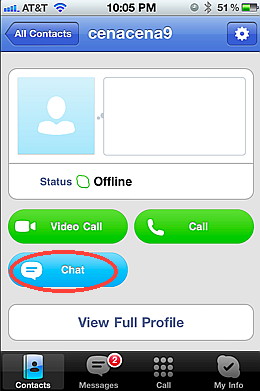
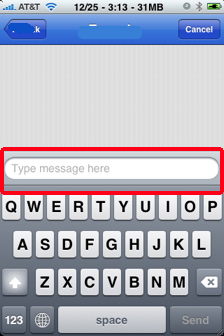
anywhere in the world using any computer running Skype. Text Chat With Skype for iPhone:The Chat button allows you to communicate with your party in text mode just like text messaging or SMS (Short Message Service).
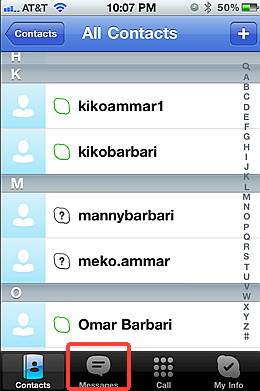
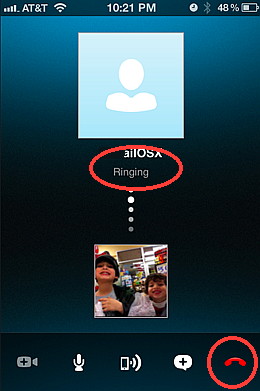
With text chatting, your party doesn't need to be online. Your message will still be delivered. A red circle with the number of text messages will be displayed next to the Chats button at the bottom of the screen indicating that there are messages waiting for you. Tap the Messages button to see all the text messages in your account. Voice & Video Calls with Skype for iPhone:An internet connection is required to make any type of call with Skype for iPhone. You can make a Video or voice call with Skype using your iPhone to computer method. You can also make an iPhone to land line phone call using Skype Out. Video and voice calls made to other Skype users on other smart phones or other computers are completely free, while you can make very cheap international calls to land line phones using Skype Out which is explained below. Tap the "Video Call" button to initiate a video call with your contact using your iPhone front facing camera or tap the "Call" button to make an iPhone to computer voice call. A ring will be sent to the other party and a screen with a picture of your party will be displayed on your iPhone. You can then tap the red hang up button at any time to end the video or voice call.
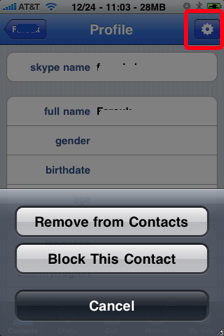
You can talk to him either by voice or by video using the front facing camera of the iPhone 4S. Tap the View Full Profile button to see more information about your contact like his full name, region, and language. Tapping the button at the top right gives you two options for that contact. One option is " Remove a contact" from your list while the other option allows you to "Block This Contact". Block will prevent a contact from contacting you in the future if you decide. Making Calls to Land line Phones With Skype Out:
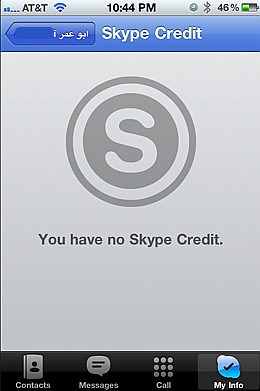
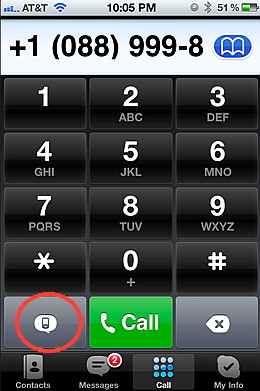
This method allows you to make cheap international calls to any phone number in the world using Skype for iPhone. To start a Skype out call, you must first have some credit in your Skype out account. If you tap a phone number, and then tap the Call button you will start a phone call to that number if you have Skype Out credit. Skype out credit is simply money that you add to your account that gives you minutes based on the cost per minute for each country. Buying Skype out credit is only allowed by using a web browser either on a desktop computer, or using Safari for the iPhone. Adding SkypeOut Credit:If you tap the My Info button at the bottom, and then tap the Skype Credit button, you will get a screen showing you how much credit you have.
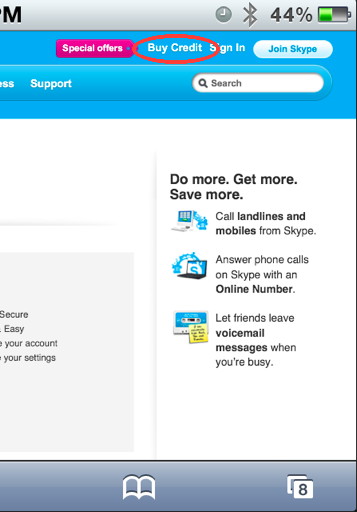
To add credit, go to Skype.com on your desktop computer, or on your iPhone safari and click "Buy Credit". You will be asked to login to your account, and then be able to add billing information, and add credit.
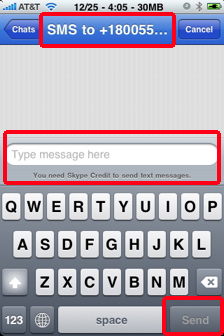
Sending SMS:With Skype for iPhone you can send iPhone SMS messages using your Skype Out credit. Simply tap the phone number you like to send the text message to, and then tap the SMS button to start typing your message. You will not be able to proceed without Skype out credit. Once you finish typing your message, simply tap the Send button.
Return From Skype For iPhone to Cheap International Calls blog comments powered by Disqus
|
 After your account is verified, and after you login with your Skype User ID, you
will appear as being available online.
After your account is verified, and after you login with your Skype User ID, you
will appear as being available online. 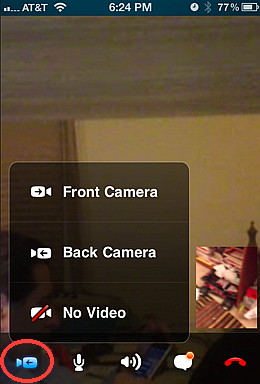
 You can add your contacts using either your
 When you tap the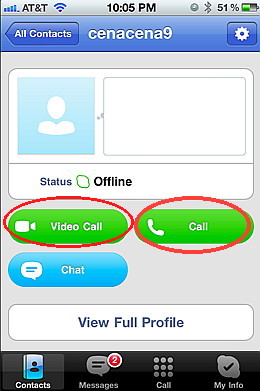
 No matter where your party
is located, if you can see his
name in your online list as "available", then you can talk to him for free by using the iPhone to computer method as long as your iPhone is connected to the internet either through 3G or wifi.
No matter where your party
is located, if you can see his
name in your online list as "available", then you can talk to him for free by using the iPhone to computer method as long as your iPhone is connected to the internet either through 3G or wifi. 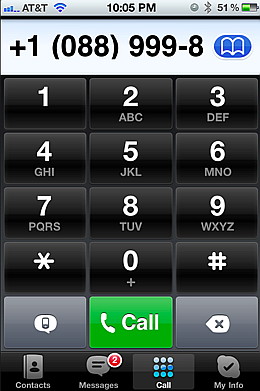 The land line method of making a phone call with Skype is called Skype Out.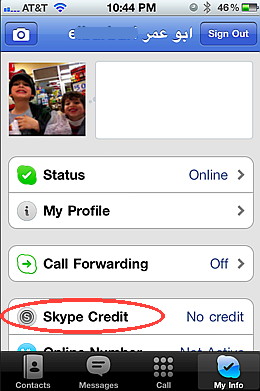

***amazon-water-case.shtml***